Skip to content

"You gotta know when to hold 'em, know when to fold 'em." - Kenny Rogers, 1978

Designing and running successful team-building events is a lot like the Kenny Rogers hit The Gambler; to make them work, you have to read the room, and be open to the power of cheesiness.
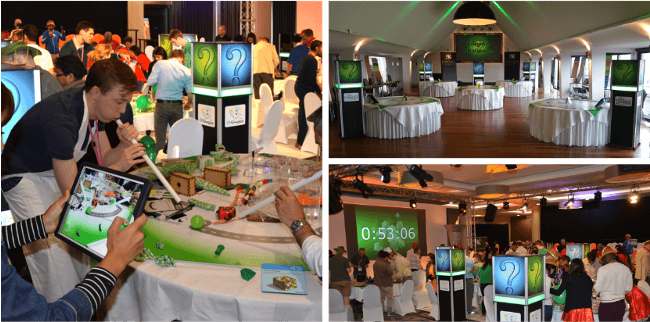
Three photographs of a CCC Events' Enigma Challenge

People are naturally cautious; all animals are, because whether you are an emu from Australia, or an estate agent from Aldershot, life is risky. But fostering team spirit requires us to share our inner selves, which runs the risk of embarrassment.

This is where cheesy games help. If a third party requires a whole group to perform a potentially embarrassing act: the risk is shared equally; and the responsibility rests wholly with the third party. In the photo above, two colleagues are trying to move a ball by blowing through tubes simultaneously. Normally they would be stuck in the office, exchanging emails, and having client meetings. The whole blowing-a-ball-about thing is frankly ludicrous. But that's the point. It's: fun; absurd; shared; and collaborative, and therefore creates shared memories that bring people together, and can even diffuse potential future tensions.

Events

CCC had many events to choose from:

  • treasure hunts;
  • murder mysteries;
  • puzzle games;
  • escape rooms;
  • outdoor board games;
  • mixology nights;
  • artistic and musical activities.
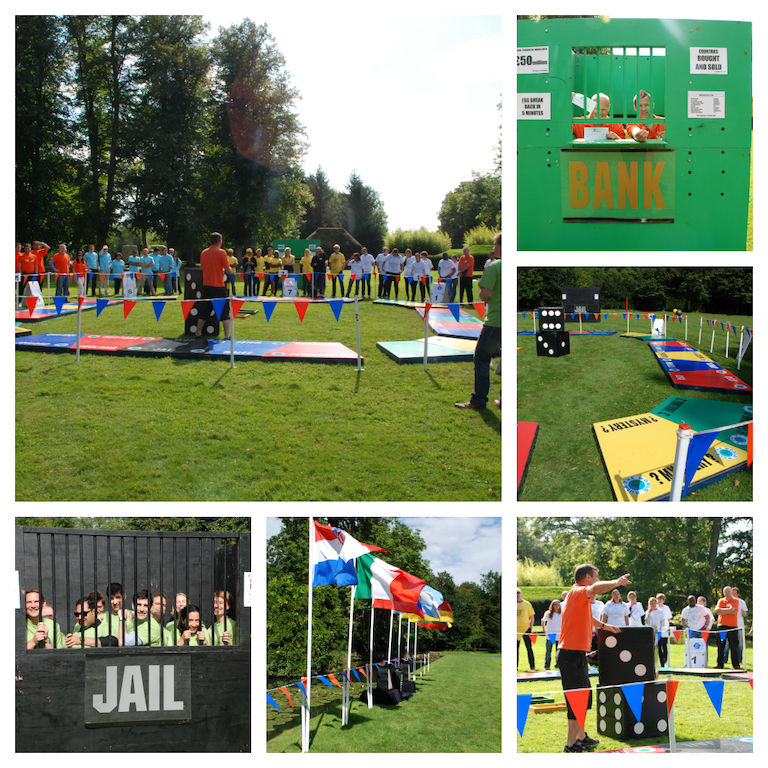
Six photographs of a CCC Events' outdoor giant board games

There were over 100 events in total; something for every palette. Some were more popular than others, such as CCC's flagship event: the...

Enigma Challenge

A photograph of four players about to start a game of Enigma Challenge

A box containing 120 different challenges: physical; mental; performative; creative. And silly. Always silly.

Teams were assigned an iPad for scorekeeping, etc. It was ostensively Richard's job to design, program, and maintain CCC's iPads and apps, but that was only possible with hands-on experience of the games and events they supported, so everyone at CCC was involved with game design: creatively; graphically; and practically.

In keeping with the Kenny Rogers song, the Enigma Challenge iPad app had to read the room. It played second fiddle - or rhythm guitar, maybe - to the box itself.

A screenshot of the main user interface of the Enigma Challenge iPad app

120 challenges that teams could complete in any order. Press a button to show a challenge, then return here once complete. Completed challenge buttons turned white, and progress was recorded discreetly in the top-right. The team name was front and centre, and that was it. Simple, unobtrusive, and - in this case - not silly.

iSpy

Another popular and less silly event was iSpy. A treasure hunt game for iPad, players would roam various cities, following clues, looking for locations and objects.
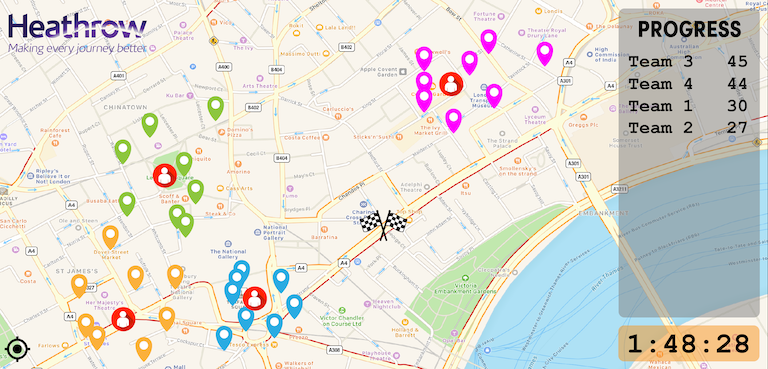
A screenshot of a the main interface of the iSpy iPad app

There would be four areas to visit, and the competing teams would converge at the chequered flag before time ran out. The clues were usually cryptic, sometimes silly, and encouraged players to focus on overlooked places around town.

Murder Mysteries

What were really silly were murder mysteries. These would be played around a dinner table, with players digesting clues and making deductions between courses. Brace yourself, as we introduce you to - ahem - Bobba Job and Dr Penny Cillin.

Four screenshots showing characters from CCC Events' murder mystery iPad apps

Yep. Penny for your thoughts, Bob? Cringeworthy, no? But again, this is all because cheesiness dissolves social barriers between people. It's not just the names, it's also the graphical clichés: confidential reports; mugshots, film noir aesthetics. It all feeds into a well-worn groove of murder mystery stereotypes that don't challenge the players, because they need to save their mental energy for the game, rather exerting it on decoding novel graphics.

Escape Works

Like Kenny, CCC knew when to fold 'em: spring 2021. CCC was unlikely to survive Covid, but it tried. The last hand it played was Escape Works: remote, online escape rooms. Enigma Challenge had raised the bar for the whole team-building industry, and CCC was understandably keen to maintain its market-leading work. The office was converted to a pop-up TV studio of small, murder mystery themed sets.

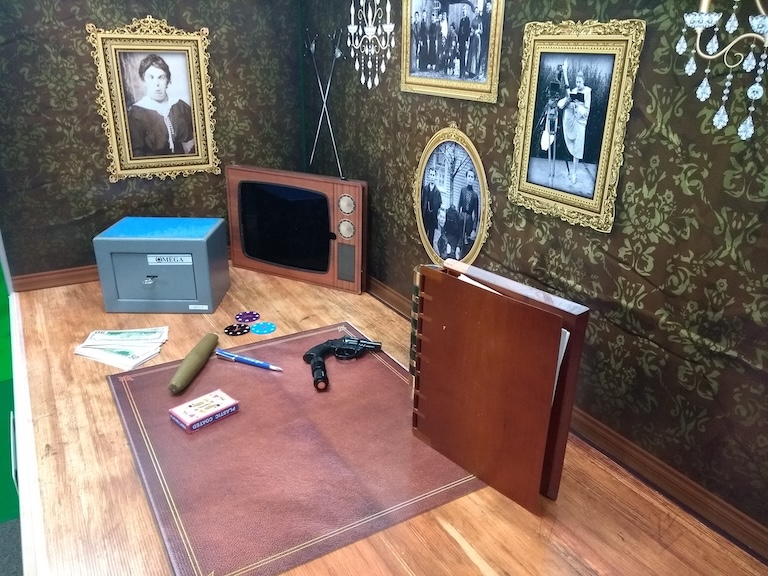
A photograph of CCC Events' television studio for running online remote escape rooms
A photograph of one of the sets of CCC Events' online remote escape rooms

These sets would be populated by actors in green screens.

A photograph of an actor in front of a green screen
A photograph of an actor in front of a green screen superimposed onto the set of a murder mystery

We researched escape room mechanics, and applied them to cliché-ridden scripts. It was an ambitious, creative endeavour, that felt groundbreaking and exciting.

But it failed. CCC was accustomed to being the best, but quality takes time, and Covid did not provide that. One often learns more from failure than success, and this experience reminded us of Kenny's advice about reading the room. A quick-and-dirty approach might have failed too, given the unprecedented conditions of lockdown, but it would have been a better strategy. And that's a reminder that what worked yesterday, last week, and last year, might not work tomorrow.

And - to split an infinitive - to always stay humble, alert, and ultimately very cheesy.

And that's it!

...

...

...or is it?

Everyone's a Winner!

Hmm. It's a contentious idea. Medals for everyone? Even the ones who came last?

Hmm... well, yes and no. The clue is in the name: team-building events. These are not competitions, nowhere is that word used. The idea is to: build; teams, not: win; games. If the team is strengthened, then - in a way - everyone wins. So not medals for everyone, no. But unity for everyone? Yes, definitely. Or that's the aim, at least.

It takes two things:

  1. configure your game correctly; and
  2. adjust in real time, where possible.

That's Kenny reminding us to read the room again; knowing when to hold them, and when to fold them. Here's an example: everyone ought to be able to escape an escape room. Set the difficulty level fairly. People have paid money, they feel short-changed if it mainly buys them disappointment. It can't be too easy, because that's just a different flavour of disappointment, but it should never be too hard either. Logic clues are fine, but sometimes need breaking. If a team is behind on time, make the four-digit code entry accept any four digits. Encode hints into the environment: all orange items matter. Go beyond just logic puzzles: a postcard telling a story where decoding the writer's feelings reveals information. Text is boring, limit it, ideally to none. Have a couple of puzzles live simultaneously of different types: a logic one, and an emotional one.

I could go on, but for now that's it.
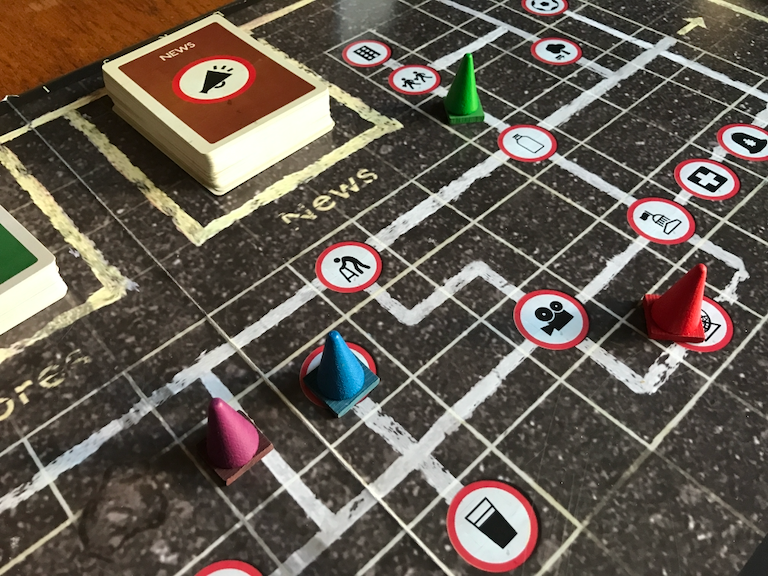
"Suburbia breeds monsters more fearsome than any dragon…"

Tranquil Vale is a board game set in the most boring town in the country. The aim of the game is to keep your spirits up, whilst completing dull chores around town like: shopping; visiting the dentist; or getting a haircut.

This post focusses on its graphics. For an overview of its game design click here.

A close-up photograph of a game of Tranquil Vale

Like all British towns, the palette of Tranquil Vale is defined by that ubiquitous material: asphalt. Mottled dark grey predominates, an appropriate choice for a game with a mechanic built around sururban tedium. And where one finds asphalt, one also finds: painted lines; potholes; litter; and broken dreams.

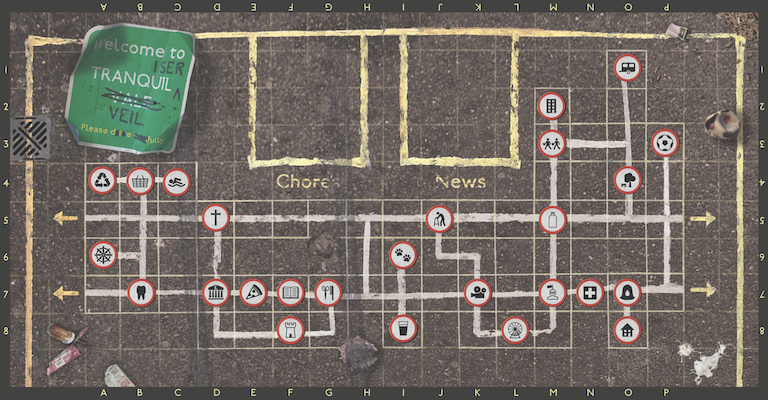
The board of the game Tranquil Vale

As on our actual roads, yellow lines create borders. White lines meanwhile denote the town's road map, connecting locations. A coherent style is achieved by having the rest of the graphics follow a road sign aesthetic. The various locations around town are denoted by red-bordered, round signs displaying simple black icons.

Details matter. The painted lines all differ slightly, and the squares containing the white lines are inconsistently sized, making the map feel more believable. And the round signs all have drop shadows so discreet you would not notice them without consciously looking. Without them though, they appear flat and lifeless.

A close-up of the top-right hand corner of the board of the game Tranquil Vale

The litter is specifically chosen too: a punctured football; a pile of cigarette butts; a squashed hedgehog. These items speak of the 1970s; a grim period, and an association that helps set the mood.

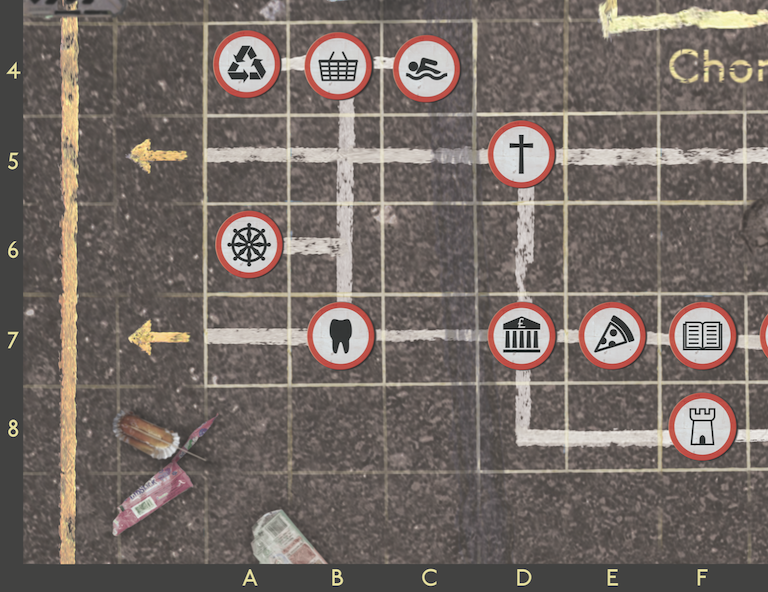
These decisions are not only influenced by scene-setting and mood though. The asphalt is a subtle shade of brown, rather than grey. Yellow on brown, with bold red circles on white, are common accessibility colour contrasts. And map references along the edge of the board continue these accessibility considerations.

A close-up of the bottom-left hand corner of the board of the game Tranquil Vale

The shopping centre is at B4; useful to know if you are playing a character based there. Like the cleaner.

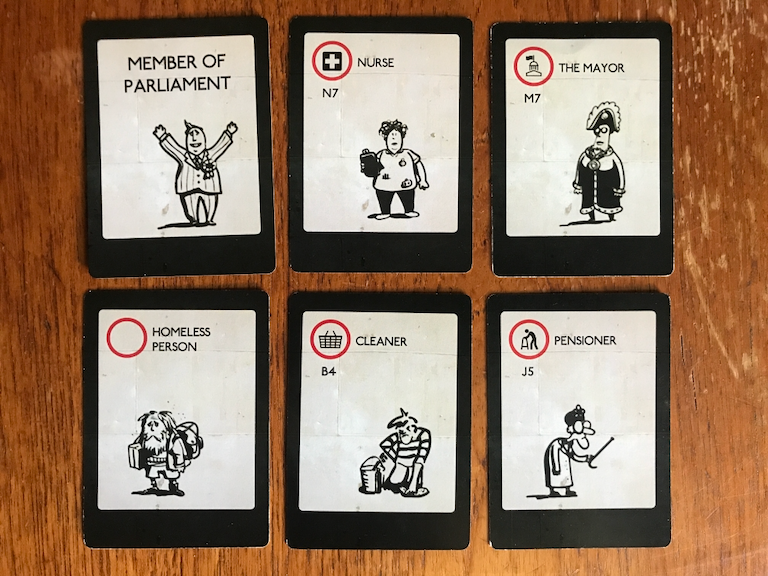
A photograph of six character cards from the game of Tranquil Vale

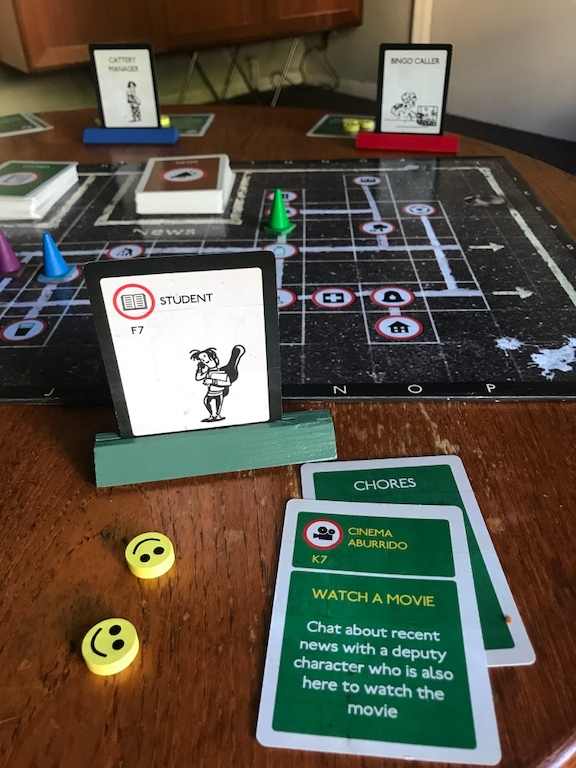
Character cards are two-sided: on the front, a icon and grid reference denoting that character's location on the board; and on the back, just the caricature and role, in a larger point size. The front is for that character's player, as she needs to know where her character is based; whilst the back is for the rest of the players, who only need to know who the character is, but be able to read it from further away.

Both sides of these cards are visible because of the coloured stands they slot into.

A close-up photograph of a game of Tranquil Vale

Here, the green player can see they are a student, based at the library at F7, whilst opposing them: a blue player playing a cattery manager; and a red player playing a bingo caller. And on the board: coloured traffic cones: appropriate playing pieces for the game's aesthetic. And in the foreground is a chores card. Our student is off to the cinema. Like the location signs on the board, and the character cards, these chores cards continue the road sign aesthetic (including the map references).

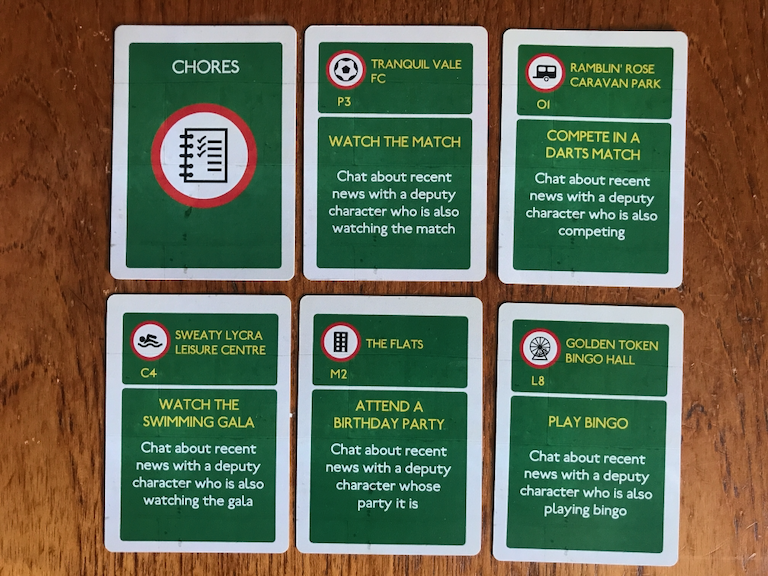
A photograph of six chores cards from the game of Tranquil Vale

Chores are straightforward enough: go somewhere; and do something when you get there.

British road signs have a few distinct colour schemes: black on white; white on green; and for cultural signs, white on brown.

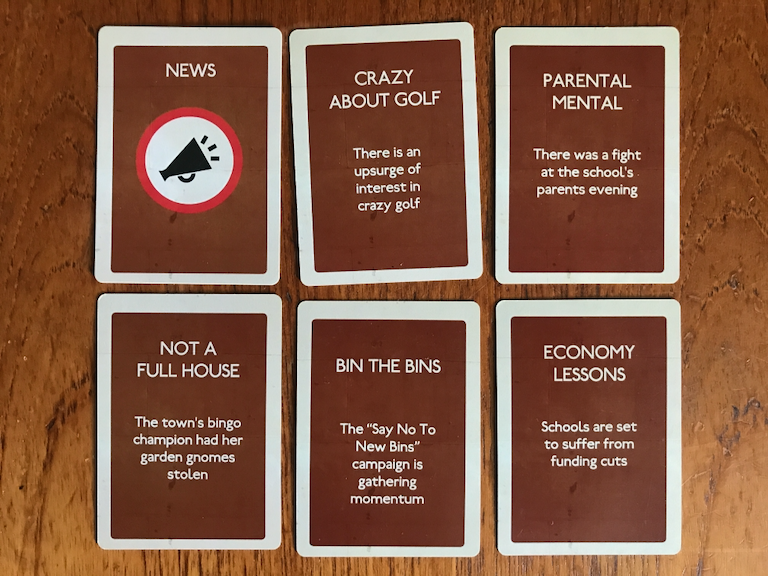
A photograph of six news cards from the game of Tranquil Vale

The game's mechanic is built around characters chatting about recent news. Each news card outlines a different, if resolutely provincial, news story (all of which, incidentally, are true stories from local papers across the UK).

The graphic design of Tranquil Vale works as a unified whole to set the mood for the gameplay. The greatest compliment one can give it is that it goes unnoticed by players. Like a good haircut - from the town's resident hairdressers Curl Up and Dye (square G7) - its quality is defined by its anonymity. It's strong and characterful, whilst merging quietly into the background.

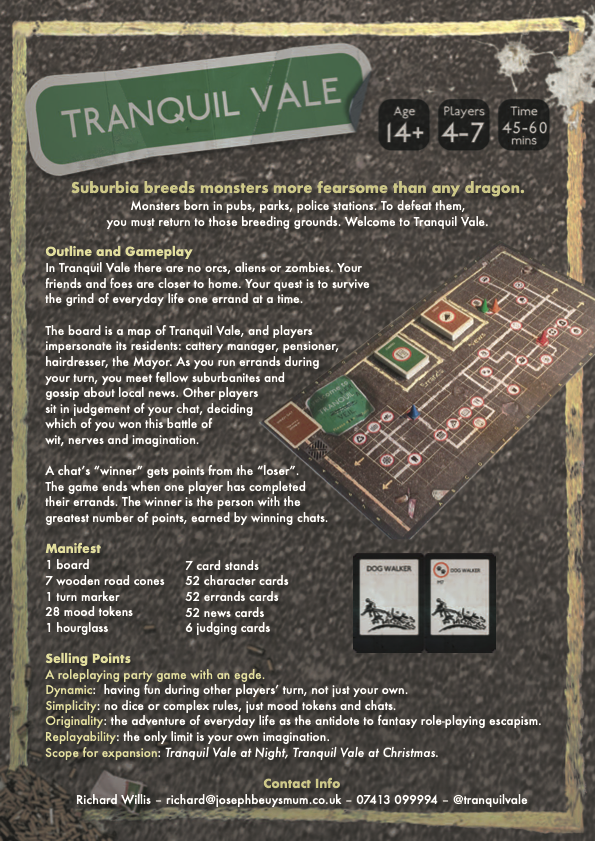
The strong and consistent aesthetics made creating associated documents like this leaflet - that was was given out at the UK Games Expo in Birmingham - very straightforward.

A leaflet designed to promote the game of Tranquil Vale

Vite is designed for front-end React development, so the notion of Node.js' process module doesn't really apply. How then does one create and access process.env environment variables? Thankfully it's surprisingly straightforward. Firstly create a .env file in your project root and put, say, the following into it:

BASE_URL = https://some.url.here

Then you can access that via Vite's own env variables object import.meta.env:

...
const url = import.meta.env.BASE_URL
...

Except that will not work. Here url will be undefined. To ensure that Vite collects and env variables meant for it, prefix your var names with VITE_:

VITE_BASE_URL = https://some.url.here
...
const url = import.meta.env.VITE_BASE_URL
...

If you missed the introductory post, please start there. Otherwise...

Why write loads of boilerplate when there are third-party libraries you can just plug in? Well there are reasons of course, but perhaps in your case they are not compelling enough, and the simplicity of a library appeals. If so, you can use comlink. Install it.

npm i comlink

Or the equivalent in yarn. Then, if you are using Vite like me.

npm i -D vite-plugin-comlink

Or the equi... Then configure Vite to use the plugin.

import { defineConfig } from "vite";
import { comlink } from "vite-plugin-comlink";

import react from "@vitejs/plugin-react";

// https://vitejs.dev/config/
export default defineConfig({
  plugins: [react(), comlink()],
  worker: {
    plugins: () => comlink(),
  },
});
/// <reference types="vite/client" />
/// <reference types="vite-plugin-comlink/client" />

And you are good to go. Back in your workers directory create a new file called comlink-worker.ts to hold our slow calculation.

export const slowCalculation = () => {
  const result = new Array<number>(30_000_000)
    .fill(0)
    .map((value, index) => value + index)
    .reduce((total, value) => total + value, 0);
  return result;
};

And thanks to the magic of other people's coad, the amount you have to write to run it is minimal.

import { useState } from "react";

export const App = () => {
  const [n, setN] = useState(0);

  setTimeout(() => setN(100 + Math.round(Math.random() * 899)), 100);

  const workerInstance = new ComlinkWorker<
    typeof import("./workers/comlink-worker")
  >(new URL("./workers/comlink-worker", import.meta.url));

  const handleOnClick = async () => {
    console.log("start comlink worker");
    const result = await workerInstance.slowCalculation();
    console.log("comlink worker result", result);
  };

  return (
    <>
      <p>{n}</p>
      <button onClick={() => handleOnClick()}>Start web worker</button>
    </>
  );
};

export default App;

There are other ways to run a web worker in React

  1. via the DedicatedWorkerGlobalScope; or
  2. with a blob.

If you missed the introductory post, please start there. Otherwise...

Part of the web APIs, blobs are file-like objects of raw data and not necessarily in a JavaScript format. a Blob() constructor can accept an array, and in the below code we can see that our blob serialises a function called workerFunction into an immediately invoked function expression that is passed into our blob as the first and only element in an array. URL.createObjectURL then creates from this blob a URL which can be used to create a new Worker. From that point on we can using the worker's capacity to send and receive messages.

import { useCallback, useEffect, useMemo, useState } from "react";

export const App = () => {
  const [n, setN] = useState(0);

  setTimeout(() => setN(100 + Math.round(Math.random() * 899)), 100);

  const webWorker = (
    workerFunction: () => void,
    inputData: string,
    callback: (result: unknown) => void
  ) => {
    try {
      const code = workerFunction.toString();
      const blob = new Blob([`(${code})()`], {
        type: "text/javascript",
      });
      const workerScriptUrl = URL.createObjectURL(blob);
      const worker = new Worker(workerScriptUrl);

      worker.onmessage = (e: MessageEvent<string>) => {
        callback(e.data);
        worker.terminate();
        URL.revokeObjectURL(workerScriptUrl);
      };

      worker.postMessage(inputData);
    } catch (e: unknown) {
      console.log(e);
    }
  };

  const workerFunction = () => {
    self.onmessage = function (e: MessageEvent<string>) {
      if (e.data === "slowCalculation") {
        const result = Array(30_000_000)
          .fill(1)
          .map((value, index) => value + index)
          .reduce((total, value) => total + value);
        self.postMessage(result);
      }
    };
  };

  const memoWorkFunction = useCallback(workerFunction, [])

  const handleOnClick = () => {
    console.log("start blob worker");
    webWorker(memoWorkFunction, "slowCalculation", (result: unknown) => {
      console.log("blob worker result", result);
    });
  };

  return (
    <>
      <p>{n}</p>
      <button onClick={() => handleOnClick()}>Start web worker</button>
    </>
  );
};

export default App;

Using a blob requires a lot of boilerplate, and results in code that can be difficult to read, debug, and maintain. Use this method by all means if it suits your purpose, but there are others:

  1. via the DedicatedWorkerGlobalScope; or
  2. with the Comlink library.

If you missed the introductory post, please start there. Otherwise...

In your src directory create a workers directory and within that a file called worker.ts.

self.onmessage = (e: MessageEvent<string>) => {
  if (e.data === "slowCalculation") {
    const result = Array(30_000_000)
      .fill(1)
      .map((v, i) => v + i)
      .reduce((t, v) => t + v);
    self.postMessage(result);
  }
};

Web workers communicate via messages. Here, the DedicatedWorkerGlobalScope is using its onmessage handler to listen for messages from individual web workers elsewhere via the self keyword, because self is the global worker scope. In this case, if the worker in question has requested a slow calculation, it performs exactly that, and returns the result.

Our app component now needs to request that response from self.

import { useEffect, useMemo, useState } from "react";

export const App = () => {
  const [n, setN] = useState(0);

  setTimeout(() => setN(Math.round(Math.random() * 9)), 100);

  const worker: Worker = useMemo(
    () => new Worker(new URL("./workers/worker.ts", import.meta.url)),
    []
  );

  const handleOnClick = () => {
    console.log("start web worker");
    worker.postMessage("slowCalculation");
  };

  useEffect(() => {
    if (window.Worker) {
      worker.onmessage = (e: MessageEvent<object[]>) => {
        console.log("web worker result", e.data);
        worker.terminate();
      };
    }
  }, [worker]);

  return (
    <>
      <p>{n}</p>
      <button onClick={() => handleOnClick()}>Start web worker</button>
    </>
  );
};

export default App;

This is the code from our introductory post with some additions

  1. a worker (created here in the recommended way from the Vite docs) which references our worker.ts file;
  2. a useEffect hook to handle results from our web worker via worker.onmessage; and
  3. an onClick handler to start the web worker.

Now we see that when the slow calculation is farmed out to the global worker scope, the UI is able to continue rendering in the meanwhile.

This is one way to implement a web worker in React, but there are others:

  1. with a blob; or
  2. with the Comlink library.

Part 1: Introduction

Given that JavaScript is single-threaded, how does one run a processor-intensive script without locking up the UI? With something called a Web Worker. which runs in a separate context to the current window. Like any JavaScript app, React apps can utilise web workers, and there are several ways of doing it. I will show you three different ways, so you can choose which is best for you:

  1. via the DedicatedWorkerGlobalScope;
  2. with a blob; or
  3. with the Comlink library.

Firstly create your own React spike, by whatever means suits you, create-react-app or Vite, or something else. Call it whatever you want. If it matters: I used Vite and called it web-worker. You will need your root app component plus whatever supports it. For me that App.tsx and these files:

index.html
main.tsx
index.css
(and App.tsx)

The first three look like this:

<!doctype html>
<html lang="en">
  <head>
    <meta charset="UTF-8" />
    <meta name="viewport" content="width=device-width, initial-scale=1.0" />
    <title>Three methods of running Web Workers in React</title>
  </head>
  <body>
    <div id="root"></div>
    <script type="module" src="/src/main.tsx"></script>
  </body>
</html>
import "./index.css";

import React from "react";
import ReactDOM from "react-dom/client";

import App from "./App.tsx";

ReactDOM.createRoot(document.getElementById("root")!).render(
  <React.StrictMode>
    <App />
  </React.StrictMode>
);
#root {
  margin: 0 auto;
}

body {
  margin: 0;
  padding: 20px;
}

Our web worker will run a background process that will not render anything to the screen, but we will put something on the screen to visualise it blocking the thread: a setTimeout function which will render a random integer to the screen ten times a second.

import { useState } from "react";

export const App = () => {
  const [n, setN] = useState(0);

  setTimeout(() => setN(100 + Math.round(Math.random() * 899)), 100);

  return (
    <>
      <p>{n}</p>
    </>
  );
};

export default App;

Next lets add a button which, when clicked, will run a slow calculation.

import { useState } from "react";

export const App = () => {
  const [n, setN] = useState(0);

  setTimeout(() => setN(100 + Math.round(Math.random() * 899)), 100);

  const slowCalculation = () => {
    const result = Array(30_000_000)
      .fill(1)
      .map((value, index) => value + index)
      .reduce((total, value) => total + value);
    self.postMessage(result);
  };

  return (
    <>
      <p>{n}</p>
      <button
        onClick={() => {
          console.log("start slow calculation...");
          const result = slowCalculation();
          console.log("slow calculation result:", result);
        }}
      >
        Press
      </button>
    </>
  );
};

export default App;

When clicked, slowCalculation hogs the processor and prevents setTimeout from updating the value of n. Clearly this is *cough* 'suboptimal.'

This is where a web worker can help, by farming that intensive process outside of the single Javascript thread. Now let's look at three ways of doing this:

  1. via the DedicatedWorkerGlobalScope;
  2. with a blob; or
  3. with the Comlink library.

[plugin:linaria] [path-to]\filename: An unexpected runtime error occurred during dependencies evaluation:
[path-to]\node_modules\@babel\core\lib\parser\index.js:75
throw err;
^

SyntaxError: [path-to]\filename: Missing semicolon. (8:1)

Hold up though, because your semicolon might not be missing. Here's the code where that error was occurring, in a file called constants.ts:

export const MOBILE_WIDTH = 414;
export const DESKTOP_WIDTH = 962;

export const RED = 'F00';
export const YELLOW = 'FC0';
export const GREEN = '0F3';

const colors = [RED, YELLOW, GREEN] as const;

export type Colors = typeof colors[number];

The semicolon was allegedly missing from the end of [RED, YELLOW, GREEN]. But that line of code is fine, and interestingly the error message disappeared when the following code - in a completely unrelated file - changed from this:

import { DESKTOP_WIDTH } from '../../constants';

const Container = styled.div`
  height: auto;

  @media only screen and (min-width: ${DESKTOP_WIDTH}px) {
    height: 69px;
  }
`;

to this:

const Container = styled.div`
  height: auto;

  @media only screen and (min-width: 962px) {
    height: 69px;
  }
`;

The Linaria docs state that [y]ou can interpolate ... imported variables. But if so why does the alleged missing semicolon error occur?

I do not know. But I do know how I fixed it and therefore what might be going on. Following some experimentation I split constants.ts into three files:

constants.ts

export const RED = 'F00';
export const YELLOW = 'FC0';
export const GREEN = '0F3';

types.ts

import { RED, YELLOW, GREEN } from './constant'

const colors = [RED, YELLOW, GREEN] as const;
export type Colors = typeof colors[number];

metrics.ts

export const MOBILE_WIDTH = 414;
export const DESKTOP_WIDTH = 962;

And then tried this again:

import { DESKTOP_WIDTH } from '../../metrics';

const Container = styled.div`
  height: auto;

  @media only screen and (min-width: ${DESKTOP_WIDTH}px) {
    height: 69px;
  }
`;

The error message disappeared.

Linaria is a static css library. I expected it to be somewhat dynamic during dev and statically compile at build time. To some degree it is, but it was not quite as flexible as I hoped or assumed it was. Perhaps then, some styles are statically generated at build time and having other values in the same file that are accessed at run time causes something to fall over inside Linaria's core code? I do not know, but more importantly this 'fixes' the 'error'.

And whilst you are here, you may wish to take note that other Linaria error messages can be misleading too.